Unicorn Ice Pop Maker
Reviews
Unicorn Ice Pop provides a straightforward and engaging activity for preschoolers. The step-by-step process of choosing a mold, adding flavors, and decorating with toppings is easy to follow. Children can experiment with different color combinations and toppings, which encourages creativity. The game is free from distractions and inappropriate content, making it a reliable choice for parents. Its repetitive but satisfying loop offers good replay value for short play sessions.
About This Game
Game Introduction
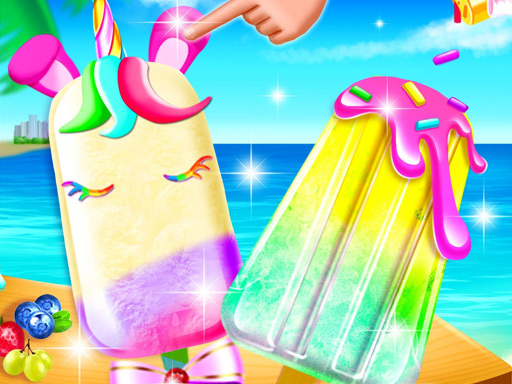
Unicorn Ice Pop - Ice Popsicle Maker Online Game: Cooking Game invites children into a bright and cheerful dessert salon. The core objective is to create colorful ice pops by selecting molds, pouring fruit flavors, and building rainbow layers. This game stands out for its focus on imaginative play, allowing kids to decorate their frozen treats with sprinkles, glitter, or fruit pieces. Designed for young children, it offers a safe and friendly digital environment where creativity and fun come together.
How to Play
Players typically start by picking an ice pop mold or popsicle shape from a selection. Then they choose a fruit flavor such as strawberry, cream, or juice to fill the mold. Colorful layers are added one by one to create a rainbow unicorn effect. After the mold is full, players decorate the ice pop with toppings like sprinkles, glitter, or fruit pieces. Finally, the creation is frozen and becomes a tasty treat. The controls use simple taps and drags, making the game easy for young children to play independently.
Game Features
Features include colorful and friendly graphics that appeal to kids, easy touch controls with taps and drags, multiple flavor options including fruit, cream, and juice, and a variety of toppings for decoration. The game is safe for all ages with no ads or inappropriate content, providing a calm and creative experience.
Tips for Success
To get the most out of the game, encourage children to experiment with different flavor combinations and layer orders to create unique rainbow effects. Trying various toppings can lead to delightful decorations. Practicing the simple tap and drag controls helps improve fine motor skills. Most importantly, let imagination guide the process—there are no wrong choices, so kids can freely explore and enjoy the colorful dessert world.
Compatibility
System Requirements