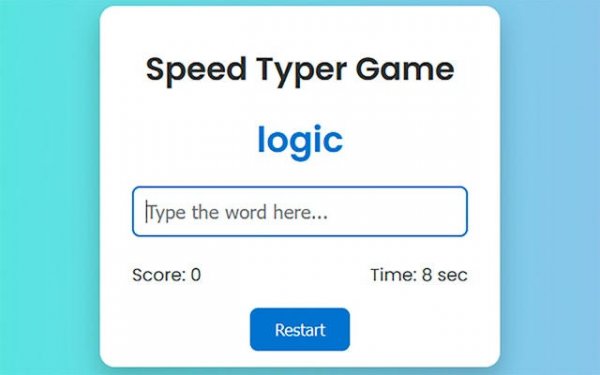
Quick Typist Challenge: Word Arena

Quick Typist Challenge: Word Arena

Publisher Great Rift Labs
Release Date 2024-07-03
Update Time 2026-07-03
Tags Casual , Skill , Word
Rating 3.0
Platform html5
Advertisement

Reviews

Quick Typist Challenge is an excellent tool for anyone looking to improve their typing skills. The game's progressive difficulty keeps you engaged, while the instant feedback helps you identify areas for improvement. The clean interface and addictive gameplay loop make practice feel like play. I've seen noticeable improvements in my words-per-minute rate since I started playing.

About This Game

Game Introduction

Quick Typist Challenge is an online word game designed to help players improve their typing speed and accuracy. The core objective is to type words or sentences exactly as they appear on the screen, including correct spelling, capitalization, and punctuation, before a timer runs out. This game is suitable for students, professionals, and casual gamers who want to enhance their words-per-minute rate in an engaging way. What makes it unique is its progressive difficulty, which increases as players improve, and the instant feedback provided after each round. This feedback helps players identify areas for improvement and adjust their technique. The game transforms a routine skill into a dynamic challenge where every keystroke matters, making it a rewarding tool for sharpening reflexes and cognitive focus.

How to Play

To play, simply type the words or sentences displayed on your screen exactly as they appear. Pay close attention to correct spelling, capitalization, and punctuation. Each correctly typed entry earns points and advances you to the next level. As you progress, the text becomes longer and the time limits become tighter, testing your composure and muscle memory. The core gameplay loop focuses on enhancing reading comprehension, hand-eye coordination, and typing efficiency. Players typically start with shorter words and simpler sentences, then gradually face more complex challenges. The game provides a clean and responsive interface, making it easy to focus on the task at hand.

Game Features

Key features include progressive difficulty that increases as you improve, ensuring the game remains challenging. A dual-metric scoring system evaluates both speed and accuracy, giving players a clear picture of their performance. The interface is clean and responsive, providing instant feedback after each round. An addictive gameplay loop motivates players to beat their personal best scores. The game may include a variety of word sets and sentence structures to keep the experience fresh. Overall, these features combine to create a fun and effective way to practice typing.

Tips for Success

To succeed, focus on accuracy first, then speed. Practice regularly to build muscle memory and improve your words-per-minute rate. Stay relaxed and avoid rushing, as errors can slow you down. Use the instant feedback to identify weak areas and adjust your typing technique. Consistent practice will help you master the progressive challenges and achieve higher scores.

Compatibility

▸ Desktop: Chrome / Edge / Firefox / Safari
▸ Mobile: iOS Safari / Android Chrome
▸ Tablet: iPadOS Safari / Android Tablet Browser
Keep your browser updated for the best experience

System Requirements

OS Windows 7/8/10 64-bit
CPU Core i3 3.3 GHz
Memory 4GB RAM
GPU Intel HD 4000
CPU (Recommended) Core i5 3.5 GHz
Memory (Recommended) 8GB RAM
OS Mac OSX Mojave (10.14.6+)
CPU Core i3 3.3 GHz
Memory 4GB RAM
GPU Intel Iris Pro 5200
CPU (Recommended) Core i5 3.5 GHz
Memory (Recommended) 8GB RAM

Follow Us

Faq

Is Quick Typist Challenge free to play?
Yes, Quick Typist Challenge is free to play online. There are no hidden fees or subscriptions required. You can start playing immediately in your web browser without any downloads.
Can I play Quick Typist Challenge on my mobile device?
Quick Typist Challenge is designed to work on most modern web browsers, including those on mobile devices. However, for the best experience with typing, a physical keyboard is recommended. The game may be less optimal on touchscreens.
Does Quick Typist Challenge track my progress over time?
Yes, the game typically tracks your scores and progress as you play. This allows you to see your improvement over time. You can compare your current performance with your previous best scores to monitor your growth.
What kind of words and sentences appear in the game?
The game uses a variety of common English words and sentences. As you progress, the complexity increases, including longer words and more complex sentence structures. The content is family-friendly and suitable for all ages.
How is my score calculated in Quick Typist Challenge?
Your score is calculated based on both your typing speed and accuracy. Correctly typed words earn points, while errors may reduce your score or time. The game uses a dual-metric system to give you a balanced evaluation of your performance.
Are there different difficulty levels in Quick Typist Challenge?
Yes, the game features progressive difficulty that increases as you improve. You start with simpler words and sentences, and as you advance, the text becomes longer and the time limits become tighter. This ensures the game remains challenging and engaging.

Games You Might Enjoy