Color Block Puzzle Stacker

Color Block Puzzle Stacker

Developer: Doctor Core Creations
Published: 1741708800
Updated: 2026-10-01
Puzzle Block Stacking Falling Blocks

Reviews

Color Block Puzzle Stacker sticks to the fundamentals of falling-block puzzles: rotate, position, and clear horizontal lines before the field fills. Its strengths are accessibility and a steady difficulty curve, with keyboard, mouse, and touch support across PC and mobile browsers. The decorative colors keep the rules clear, though players seeking color-matching mechanics or level-based progression may find the endless format less structured than they prefer.

About this game

Core Stacking and Line Clearing

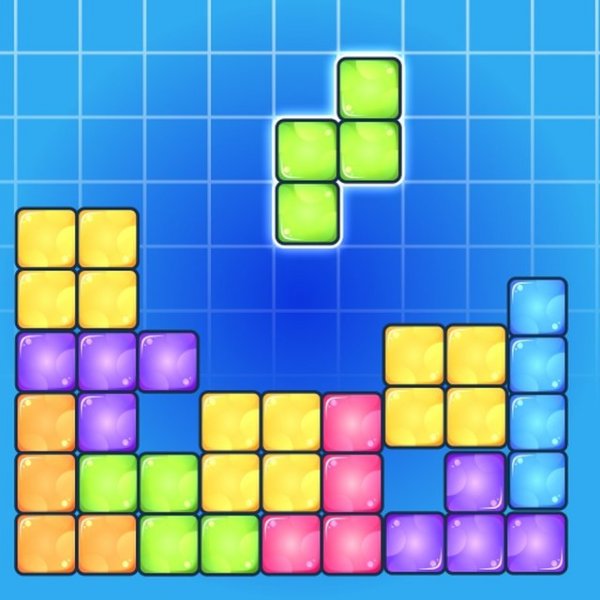
Each round presents a playing field that fills from the bottom as blocks descend from above. Your job is to move, rotate, and drop those blocks so they form unbroken horizontal lines. When a line is complete, it disappears and awards points, opening space for the next pieces. The colored appearance of the blocks is decorative; color does not change how a block behaves or scores. What matters is shape and placement, so the game rewards spatial reasoning rather than color matching.

Controls and Platform Support

On a keyboard, players typically use arrow keys or similar inputs to shift a block left or right, rotate it, and adjust its descent speed. Mouse and touch controls are available on mobile phones and tablets, and the game runs in web browsers across PC and mobile devices. That range means a session can start without installing anything, whether you have a few minutes on a phone or a longer stretch at a desktop.

Pacing and Difficulty Curve

New blocks keep falling at a steady rate, and the challenge rises gradually as play continues. Early on, there is room to recover from a misplaced piece; later, the field offers less margin for error. Because the difficulty is tied to the ongoing pace, planning ahead becomes more important than reacting quickly. Keeping the stack relatively flat and filling gaps evenly helps delay the moment when the field becomes too full to continue.

Who It Suits

The straightforward rules and cheerful visual style make Color Block Puzzle Stacker accessible to beginners, while the gradual increase in speed gives experienced puzzle players something to chase. It works for short breaks or extended sessions, and the absence of color-based rules keeps the focus on pattern recognition and deliberate placement. Players who enjoy thinking a move or two ahead will get the most from it.

Editorial Notes

Compatibility

✅ Works on PC & Mobile | Recommended: Chrome / Safari / Edge

Faq

Do the block colors affect scoring or gameplay in Color Block Puzzle Stacker?
No. The colors are purely decorative and do not change how blocks behave or how lines are cleared. Scoring depends on completing horizontal lines, regardless of which colors form them. This keeps the focus on shape and placement rather than color matching.
Can I play Color Block Puzzle Stacker on a phone or tablet?
Yes. The game is built to run in web browsers on PC, mobile phones, and tablets. Touch and mouse controls are available alongside keyboard input, so you can play on whichever device is convenient without installing separate software.
Is there a set number of levels in Color Block Puzzle Stacker?
The game is described as endless, with new blocks falling continuously and difficulty increasing over time. There is no stated level count or final stage. Progress is measured by how long you keep the playing field from filling up and by the points earned from cleared lines.
What is the best way to keep the playing field from filling up?
Try to keep the stack as flat as possible by filling gaps evenly across the bottom. Avoid leaving deep wells that are hard to reach. Looking at the next block before placing the current one also helps you plan placements that preserve open space.
Does Color Block Puzzle Stacker require any special skills to start?
No prior puzzle experience is needed. The controls are simple, and the rules are limited to moving, rotating, and dropping blocks to complete lines. Beginners can start immediately, while the gradual speed increase provides depth for players who want a longer challenge.
Can I adjust how fast the blocks fall?
Yes. Players can adjust a block's descent speed as part of the standard controls. On a keyboard this is handled through the input scheme, and equivalent touch or mouse actions are available on mobile devices. Slowing a block down gives you more time to position it precisely.

Comments

0 comments
U
User
★ ★ ★ ★ ★
Loading comments...